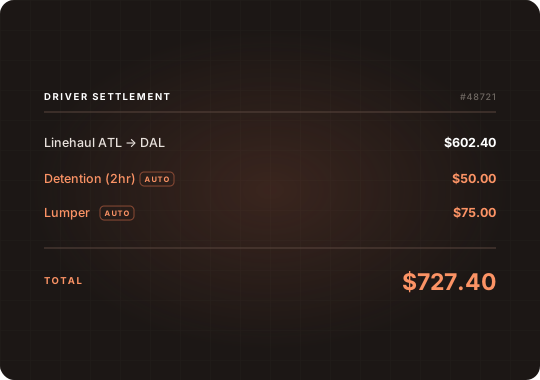
Contracted Rates
Customer and carrier rates auto-apply the moment a load matches the lane.
Automate repetitive work and eliminate the manual touchpoints that slow your team down.
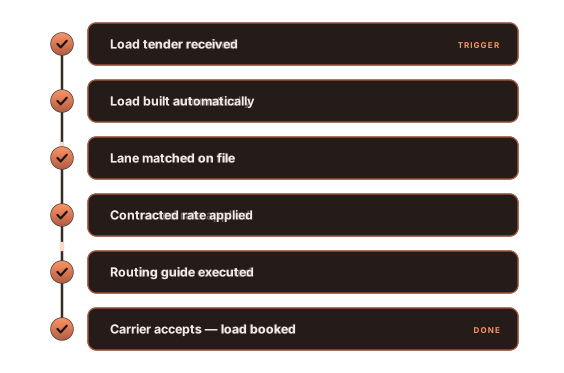
When a load matches a lane, rates, patterns, and routing decisions are automatically applied—no manual touchpoints required.
Customer and carrier rates auto-apply the moment a load matches the lane.
Turn a simple O→D into how the load will actually move — multi-leg routing, automatically.
Set the rules once, and the carrier waterfall executes automatically—no manual tendering required.
ArcBest Truckload increased automated routing guides on their dedicated lanes by 90% — eliminating almost all manual tendering.

Three strategies to choose from, all auto-executed on every load that matches the lane.
Tender based on preferred carrier order. If they reject, automatically move to the next carrier in the routing guide until the load is covered.
Tender to the cheapest qualified carrier on the routing guide. Find the best rate every time.
Tender to multiple carriers simultaneously—the first to accept is awarded the load.
Automate the routine based on the business rules. Route the exceptions to your team as needed.
Validate carrier invoices against the load details, route exceptions to your team, and auto-pay clean invoices — based on rules you set.
Generate customer invoices the moment your shipment conditions are met. Configure customer-specific formats once, then let the system handle delivery.
Apply configurable routing patterns to incoming loads—automatically turning simple origin-destination pairs into complete multi-leg routes.